
DITA without an XML editor: author in Word
Structured-content programs stall when experts will not adopt an XML editor. The alternative: author in Word, DITA applied behind the scenes.

Structured content sounds like a tooling decision. It is not.
The mechanics (DITA topic types, content references, maps, the toolkit) are tooling. The decision underneath is whether the people who hold the domain knowledge are willing to author in a system they did not choose, in an editor that exposes structural metadata they did not ask for, against a schema they were not trained on.
In most regulated-industries organizations, the answer is no.
The pattern that breaks structured-content programs
It plays out the same way almost every time. The documentation team sees the cost of inconsistency across labels, manuals, SOPs, regulatory submissions. They build a business case for component content management. They evaluate CCMS vendors. They pick one. The technical-writing team adopts it. The new authoring environment looks great.
Then the structured-content program tries to extend across the SME population: the medical writers, the regulatory specialists, the senior engineers, the compliance officers, the clinical scientists. These are the people who actually generate the source content. And the rollout stalls.
The SMEs receive the training. They sit through the demo. They open the XML editor. They are asked to author in an environment that looks nothing like the one they have used for the past twenty years. They have a deadline. They open Word, write the document, email it to the documentation team, and ask the technical writers to handle the structured version.
The technical writers do what they have always done: they receive a Word file, convert it by hand into DITA, paste it into the CCMS, and hope nothing was lost in translation. The structured-content program now has a single point of failure (the documentation team), and the SMEs are not really in the system. They are upstream of it.
Why “just train the SMEs” does not work
The objection is not really about the editor. The editor is the symbol of the underlying problem, which is that the SME is being asked to take on structural responsibility for content that was, until yesterday, just text. They are being told they need to think about topic types, content references, conditional profiling, schema validation, and reuse modeling, all in service of a program that doesn’t help them with the thing they were actually hired to do.
The dry observation is this. A medical writer is not paid to be an information architect. A clinical scientist did not get a doctorate so they could think about topic types. A senior engineer is not measured on whether their content reuses well downstream. The structural concerns are real, but they are not the SME’s job. Asking the SME to internalize them is asking them to do someone else’s work.
The training does not fail because the SME is stupid. It fails because the training is asking the SME to volunteer for a role they did not sign up for.
What the alternative looks like
The alternative is to keep the structural responsibility where it belongs, in the system and in the technical-writing team that owns the content architecture, and to give the SME a surface they already know.
In practice, that surface is Microsoft Word. The technical mechanism is a Word add-in that the CCMS provides (see Authoring in Word for how DitaExchange Dx5 implements this specifically). The add-in:
- maps Word’s structural primitives (headings, paragraphs, lists, tables, styles) onto DITA element types automatically
- presents the SME with the editor they have used for years, plus a sidebar or task pane showing the structured-content context (which topic they are editing, which documents it appears in, the approval workflow status, the version history)
- validates the resulting DITA at save time, so structurally invalid content cannot be stored
- captures the SME’s contribution as a first-class event in the CCMS audit trail: author, timestamp, change rationale, approval chain
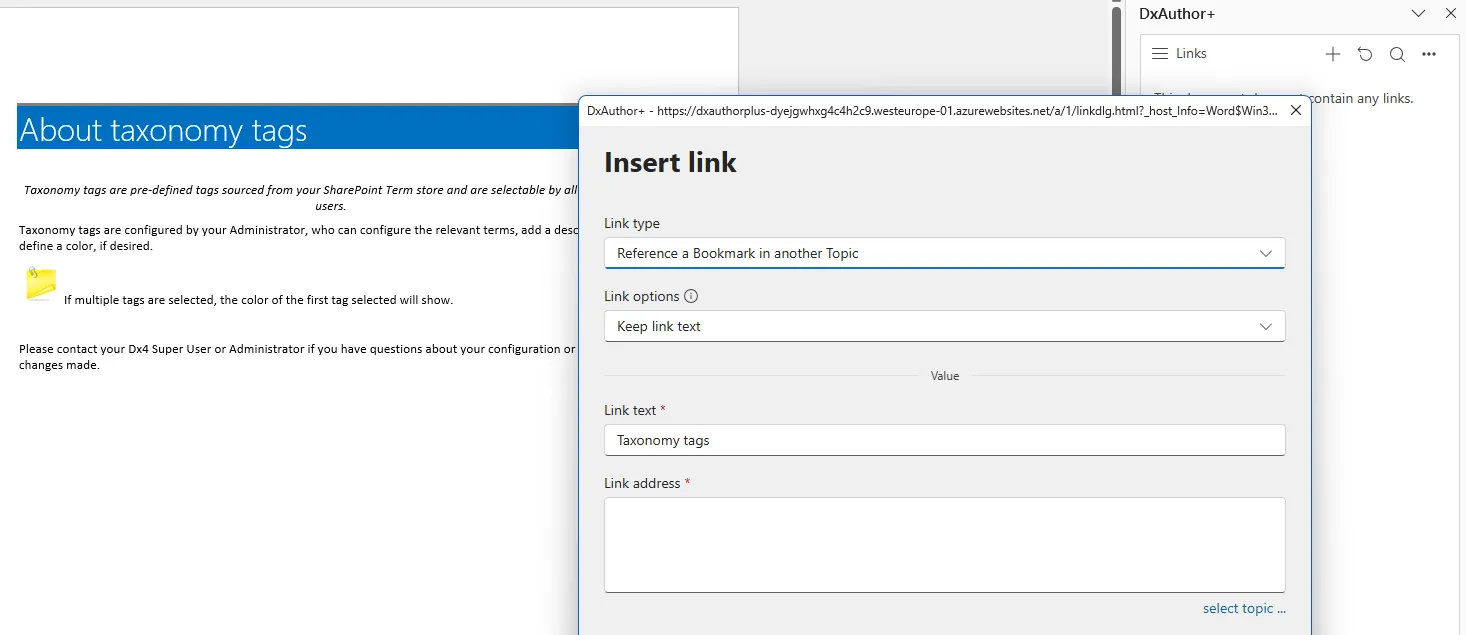
DxAuthor+ in Word. The author sees the document they expect; the structure layer (topic membership, approval status, version history) sits in the side pane. No XML editor was opened to produce this content.
The SME does not see angle brackets. They do not need to know what a content reference is. They write a heading and a paragraph. The CCMS stores a DITA topic with a title element and a paragraph element. From the technical writer’s view, looking at the same content in a dedicated XML editor, it is well-formed DITA that can be referenced from a content map and reused across documents.
The technical writer keeps the editor they prefer. The SME keeps the editor they need. Neither population is asked to adopt the other’s tooling. The content base is shared.
Which CCMS products are built around this
Two products in the DITA CCMS field are built around Word-based authoring as a first-class concern: DitaExchange and Quark Publishing Platform. Both treat Word as a live authoring surface, not as an import/export integration.
Most other CCMS vendors approach Word differently. Paligo uses a browser-based XML editor designed to abstract the structure for non-technical authors, but Word is not the editor. RWS Tridion, Heretto, and IXIASOFT assume a dedicated DITA-aware XML editor (Oxygen XML Author, XMetaL, Arbortext). Some integrate with Word for import or comment workflows, but the SME is not authoring inside the CCMS from Word.
Adobe FrameMaker is sometimes positioned as Word-adjacent for structured authoring, but it is a separate authoring application, a competent one, but a different one the SME still has to adopt.
The narrow field of CCMS products that genuinely keep the SME in Word is small. The two that do are doing it deliberately because their customer base demanded it.
DitaExchange goes one step further by pairing Word-based authoring with SharePoint as the content store, the only Microsoft-native option in the category, with audit-grade approval workflows inherited from the SharePoint substrate.
Where DitaExchange sits in that field
DitaExchange is the only one of the two that also runs the storage layer on Microsoft SharePoint. That means the entire toolchain (authoring surface, content storage, identity, audit trail, access control) is built on platforms an enterprise Microsoft 365 customer already operates.
The SME authors in Word. The content lives in SharePoint. The audit trail flows into the SharePoint workflow the compliance team already monitors. The IT department is not asked to stand up a new platform. The procurement team is not asked to evaluate a new vendor for security and data residency from scratch.
The structured-content program stops being a parallel platform decision and starts being an additive layer on the substrate that is already there.
The bottom line
Most structured-content programs that stall do so for the same reason: the subject matter experts will not adopt the XML editor. Forcing them to is not the answer. Building the structure around their existing surface is.
For Microsoft-heavy organizations in regulated industries, that surface is Word, that storage is SharePoint, and the CCMS layer that pairs the two is DitaExchange.
Frequently asked questions
Can you really do DITA authoring without an XML editor?
Yes, provided the CCMS treats Word (or another familiar surface) as a first-class authoring tool, not as a fallback. The technical mechanism is a Word add-in that maps Word's structural primitives (styles, lists, tables, tracked changes) onto DITA element types behind the scenes. The author writes a heading and a paragraph in Word; the add-in stores it as a DITA topic with a title element and a paragraph element. The author does not see angle brackets. The CCMS validates that the resulting DITA is well-formed at storage time and prevents structurally invalid content from being saved.
How is this different from just exporting Word to DITA after the fact?
Export-after-the-fact treats Word as a draft tool and DITA as the destination format. That model has a known failure mode: drift. As soon as the document is approved in Word and exported to DITA, the two versions diverge. The next change is made in whichever version the author has open, and the other version goes stale. A CCMS with Word as the live authoring surface keeps Word and DITA as views of the same content, not separate copies, there is no export step because the storage is already DITA.
Which CCMS products support real Word-based DITA authoring?
Two: DitaExchange and Quark Publishing Platform. Other CCMS vendors (Paligo, RWS Tridion, Heretto, IXIASOFT, Adobe FrameMaker as authoring-only) either require a dedicated XML editor or treat Word as an import/export integration rather than a live authoring surface. DitaExchange is the only one that pairs Word-based authoring with SharePoint as the storage layer, so for organizations already on Microsoft 365, the entire toolchain is built on existing platforms.
What about authors who do want to work in XML directly?
Technical writers, information architects, and translation specialists often do prefer a structured editor for the precision and the schema-level work it enables. Both DitaExchange and Quark support that mode in parallel, a dedicated XML editor for the technical-writing team, Microsoft Word for the subject matter experts contributing into the same components. The two populations co-exist in the same content base. The point is not to force the SMEs out of Word; the point is not to force the technical writers into it either.
Does this work for regulated content where the audit trail matters?
Yes, and arguably better than the XML-editor-only model, because the SMEs are actually using the system. The audit failure mode in regulated content is rarely 'someone bypassed the validation'; it is 'the SME emailed a Word file to a technical writer who hand-converted it and broke the chain of custody.' Keeping the SME in Word, inside the CCMS, means the audit trail captures the SME's contribution as a first-class event rather than as a side-channel.