
CCMS on SharePoint, not next to it
A CCMS that integrates with SharePoint is not the same as one that runs on SharePoint. The structural difference, and why it matters on Microsoft 365.

CCMS vendors that “integrate with SharePoint” and CCMS vendors that “run on SharePoint” sound similar in a feature checklist. They are doing structurally different things.
The distinction is worth being explicit about because the marketing language has blurred. Several CCMS platforms claim “SharePoint integration”, which in practice means anything from “we can ingest content from SharePoint folders” to “we publish output to SharePoint sites” to “we can be deployed in your Azure subscription”. None of these is the same as running on SharePoint.
This post draws the line cleanly and explains why the distinction decides the implementation timeline, the IT posture, and the long-run operating cost for organizations standardized on Microsoft 365.
The two architectures
Integration architecture. The CCMS stores components in its own repository, typically a vendor-managed database backed by file storage. The repository has its own data model, its own access-control system, its own audit log, its own backup and disaster-recovery posture. SharePoint enters the picture through connectors: ingest connectors pull content from SharePoint folders into the CCMS repository; sync connectors keep references aligned between the two systems; publishing connectors push CCMS-produced output back to SharePoint sites or document libraries.
The integration architecture preserves the vendor’s preferred operating model. The vendor controls the repository; the customer controls the integration boundary. The two systems run side by side, and the integration layer is the joint reconciled by SharePoint-aware tooling.
Native architecture. The CCMS uses SharePoint as the persistence substrate. The components live as items inside SharePoint document libraries. The access control is Entra ID and SharePoint permissions directly. The audit log is the SharePoint audit log. The workflows are Power Automate flows or SharePoint workflows. The backup is whatever SharePoint backup the customer already operates. There is no separate repository, the CCMS is an application that runs on top of SharePoint, the way a CRM might run on top of a database.
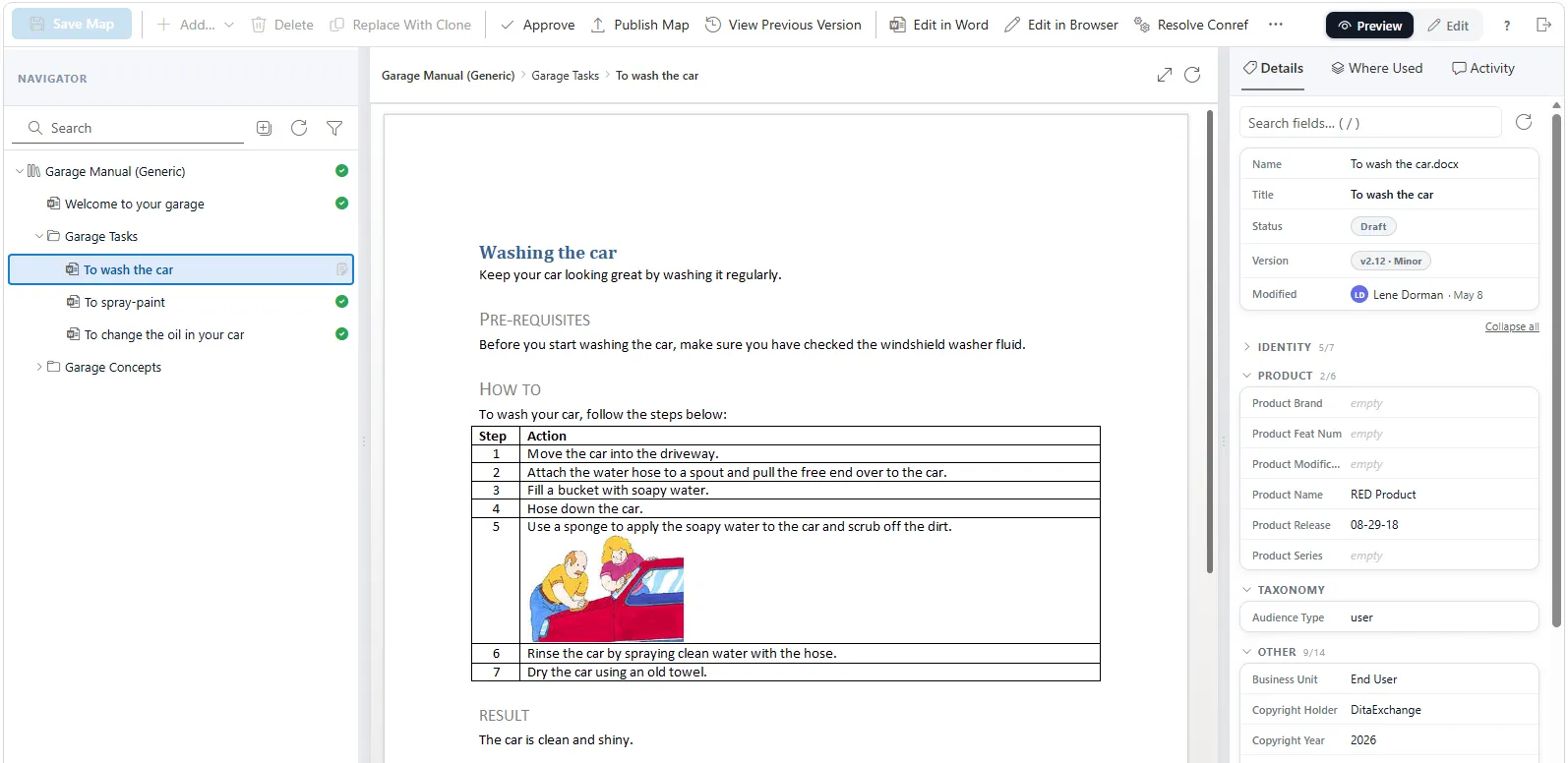
Dx5 inside SharePoint. The component navigator is a SharePoint application; the topics and maps are SharePoint items; the user is the user SharePoint already authenticated. This is what “native architecture” looks like at the URL bar, not what the architecture diagram claims.
The native architecture puts the platform decision in the customer’s hands. The CCMS extends SharePoint with the DITA component model, the structured-content workflows, and the Word-based authoring surface; it does not constitute a parallel content platform.
Why the distinction is load-bearing
For organizations standardized on Microsoft 365, the integration architecture preserves a parallel-platform decision and the native architecture eliminates it. Five concrete consequences:
Data residency. With integration, the CCMS repository sits wherever the vendor hosts it, typically the vendor’s cloud, in the vendor’s chosen region. The customer’s existing M365 tenant data-residency configuration does not apply. The customer either accepts the vendor’s posture or negotiates a different one, which takes time and often costs more. With native, the components live in the customer’s tenant; the data residency is whatever the tenant is already configured for.
Identity. With integration, the CCMS has its own user model, even if SSO is set up against Entra ID for authentication. Authorization is the CCMS’s own permission system, joiner-mover-leaver processes have to fire in two places, and quarterly access reviews cover two distinct user populations. With native, the access control is Entra ID and SharePoint permissions; there is no separate user population to maintain.
Audit logging. With integration, the CCMS produces its own audit log, which has to be integrated into the customer’s SIEM separately from the SharePoint audit log. Two log sources mean two ingestion pipelines, two retention policies, and two sets of correlation rules. With native, the audit log is the SharePoint audit log, which the customer’s SIEM already ingests.
Disaster recovery. With integration, the CCMS repository has its own DR posture: backup frequency, point-in-time restore, failover topology. The customer either accepts the vendor’s defaults or pays for an enhanced posture. With native, the DR posture is whatever SharePoint already does; no second plan to write, test, or pay for.
Compliance. With integration, the CCMS has to be evaluated against the customer’s compliance framework as a separate system. ISO 27001 scope, SOC 2 attestation, GDPR data-processor agreement, sector-specific compliance frameworks, all duplicated for the new system. With native, the CCMS inherits the SharePoint compliance posture; the additional compliance review is much smaller because the substrate is already in scope.
The combined effect is that the integration architecture asks the IT department to onboard a parallel content platform with the full discovery, due-diligence, integration, and operating cost of a new platform. The native architecture asks the IT department to onboard an application that runs on top of an existing platform. The first typically takes six to twelve months and continues to cost throughout the operating lifetime; the second typically takes weeks and incurs no continuing reconciliation overhead.
What this looks like in practice
The single most common stuck pattern we see in CCMS evaluations is this. The customer is on Microsoft 365 by IT decision. The documentation team has been told to evaluate a CCMS. The shortlist contains two or three SaaS-only DITA CCMS vendors that “integrate with SharePoint” plus one vendor that runs on SharePoint. The feature comparison comes out roughly even: DITA support, content references, profiling, translation memory integration, publishing pipelines, all present in some form across all four vendors.
The evaluation team picks the vendor with the cleanest UI demo. Six months later the IT integration is still in progress; another six months later it is operational but the joiner-mover-leaver process for the CCMS is documented as a separate workflow; another six months later the SIEM team is fielding requests to ingest a second audit log source.
The two-year-in postmortem usually reaches the same conclusion: the UI difference at evaluation time was real but small, and the operating-overhead difference was structural and large. The team would have picked differently if the operating overhead had been visible up-front.
The diagnostic questions
For any CCMS evaluation in a Microsoft-365-standardized organization, three questions distinguish the two architectures:
“Where do the components actually live?” If the answer is “in our repository, with connectors to SharePoint”, that is integration. If the answer is “in your SharePoint document libraries, as SharePoint items”, that is native.
“What identity system controls access to a specific component?” If the answer is “our user model, with SSO against Entra ID”, that is integration. If the answer is “Entra ID and SharePoint permissions, directly”, that is native.
“Where does the audit log live?” If the answer is “our audit log, ingestible via API into your SIEM”, that is integration. If the answer is “the SharePoint audit log, which your SIEM already ingests”, that is native.
Some vendors will say all of the right things in response to these questions because they have technically implemented some surface-level alignment. The follow-up is to ask the IT integration team, the people who will actually operate the system, to walk through the access provisioning and the audit-log review process. The integration architecture’s operating overhead becomes obvious when the people who will live with it have to describe it concretely.
Where DitaExchange sits
DitaExchange Dx5 is in the native camp. The components are DITA XML stored as SharePoint items in the customer’s tenant. The access control is Entra ID and SharePoint permissions directly. The audit log is the SharePoint audit log. The workflows run on the customer’s SharePoint and Power Automate. There is no DitaExchange-side repository.
This is not the only viable architecture. For organizations not on Microsoft 365, the native architecture forces a Microsoft commitment that the integration architecture does not. For organizations actively leaving SharePoint, the native architecture is the wrong direction. The honest scope of the argument is “for organizations standardized on Microsoft 365 with no active plan to move off it, the native architecture is the right answer”, which covers most regulated-industries customers but not all.
For the wider architectural treatment, see DITA on SharePoint, a complete architectural guide. For the case for keeping SharePoint as the substrate, Your SharePoint is your CCMS, the no-migration argument. For the product expression of all of the above in Dx5, Built on SharePoint.
Frequently asked questions
What's the difference between a CCMS that integrates with SharePoint and one that runs on SharePoint?
The first stores components in the vendor's own repository and provides connectors to SharePoint for ingest, synchronization, or publishing. The second uses SharePoint as the storage substrate: the components are SharePoint items, the identity model is Entra ID, the audit log is the SharePoint audit log. The first preserves the parallel-platform decision; the second eliminates it. Both are sometimes marketed as 'SharePoint integration', which makes the distinction worth asking about explicitly in evaluations.
Why does this distinction matter?
Because the parallel-platform decision carries real cost. A CCMS that lives next to SharePoint requires its own security review, its own data-residency assessment, its own identity integration, its own audit-log integration, and its own disaster recovery procedure. For regulated-industries customers this typically adds six to twelve months to the implementation timeline and creates a permanent reconciliation overhead between the two systems. A SharePoint-native CCMS inherits all of those decisions from the SharePoint that IT already operates.
Doesn't running a CCMS on SharePoint limit what the CCMS can do?
It limits some things and enables others. The limit is that the CCMS has to express its operations in SharePoint primitives: document libraries, items, columns, content types, workflows. The enablement is that the customer's existing identity, audit, compliance, and DR posture extends to the CCMS at no additional cost. For most regulated-content estates, the trade is overwhelmingly favorable; the SharePoint primitives are rich enough to express what a CCMS needs, and the inherited IT posture is the half of the picture that costs the most to build separately.
What about vendors that offer 'SharePoint deployment'?
Some vendors offer the ability to deploy their CCMS into the customer's Azure tenant alongside SharePoint, which is different from being SharePoint-native. The components are still stored in the vendor's own repository (now hosted in the customer's Azure subscription rather than the vendor's), but the components are not SharePoint items, the access control is not Entra ID directly, and the audit posture is not the SharePoint audit log. The distinction is important; ask where the components actually live.